A better home for your books
Carrel is a local-first desktop app for the books you already own. Read EPUBs, MOBI files, PDFs, and comic archives on your machine, with no account or cloud sitting between you and your library.
What Carrel does well
Reading comfort first, library management second, and no push toward a store or cloud account.
EPUB, MOBI, PDF, CBZ and CBR
Five formats in one reader. Reflowable ebooks, Kindle MOBI/AZW files, fixed-layout PDFs, and comic archives — each with its own viewer. Read EPUBs page-by-page or in continuous scroll. Dual-page spreads and right-to-left manga mode work across all formats. (Kindle formats need the Apple Silicon build on macOS — the Intel build ships without MOBI support.)
Collections, tags and series
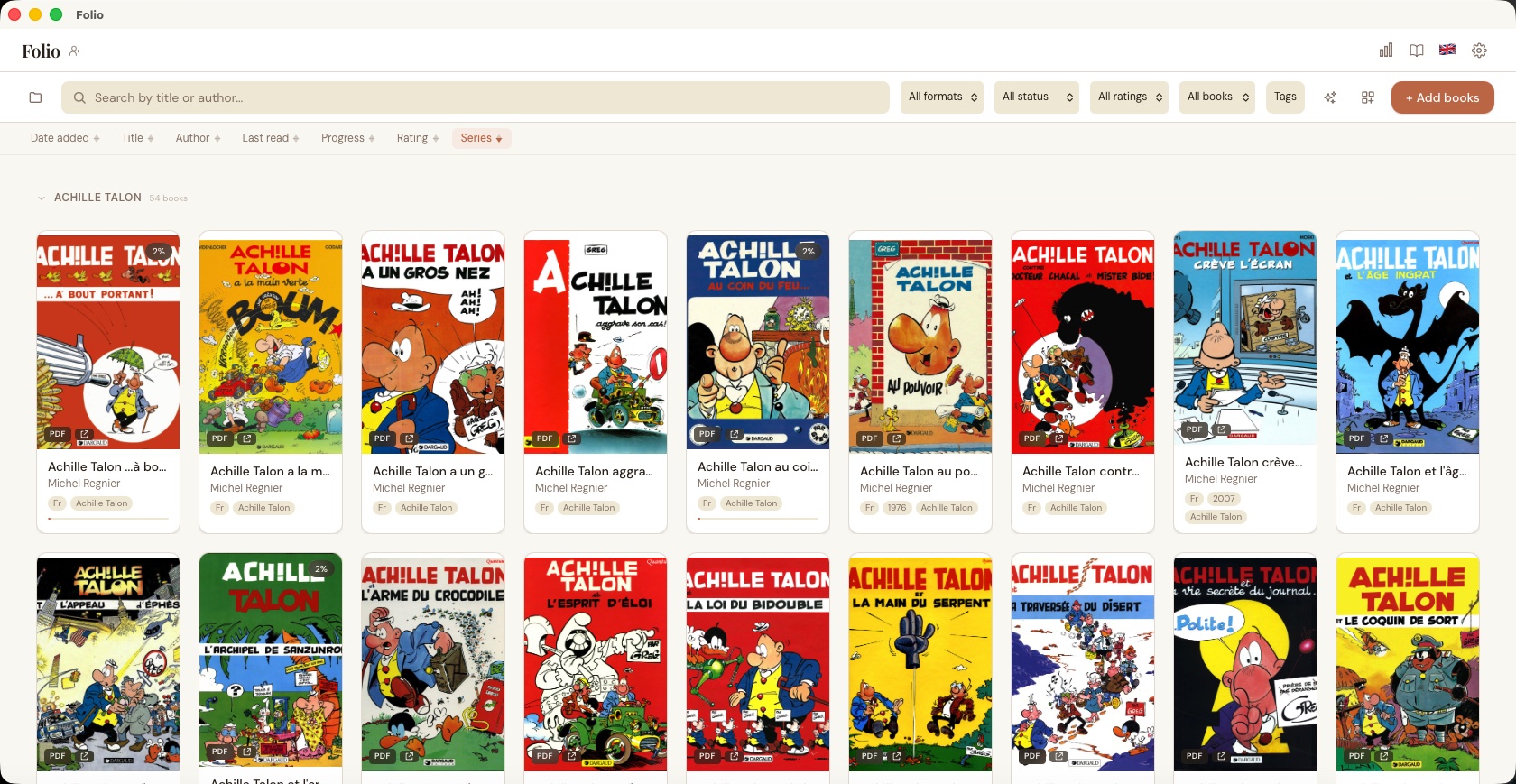
Manual and rule-based collections, plus smart suggestions that spot patterns in your library. Freeform tags, series grouping with a stacked tile view, and filters that combine across format, status, rating, and tags. Flag books as "want to read" and filter to them. The Collections panel filters live as you type and floats over your library instead of squeezing the grid.
Highlights, bookmarks and notes
Five highlight colors, named bookmarks, and notes on any passage — in EPUBs and now PDFs, which get a selectable text layer you can copy from and highlight per page. Search across all your highlights from the library when you remember the idea but not the book. Export as Markdown, or turn any highlight into a styled quote card — light, sepia, or dark, with an optional cover — and copy it or save it as a PNG to share.
Dictionary and vocabulary
Select a word and hit Define for an offline definition — parts of speech, senses, an example, synonyms — from a ~7 MB Princeton WordNet dictionary you download once. No network, no accounts. Opt in and every word you look up joins a per-profile vocabulary list you can review with spaced-repetition flashcards. Define, saved words and flashcard review all work in the web reader too, so looking a word up on your phone puts it in the same list.
OPDS catalog browsing
Browse Project Gutenberg, Standard Ebooks, Wikisource, Gallica, and a dozen other free sources without leaving the app. Add your own catalog URLs (self-hosted Calibre, another Carrel instance) and import with one click. Catalogs that don’t allow anonymous access take a username and password or a single API key — stored in your OS keychain, never in Carrel’s database, and only ever sent to the catalog it was set up for. Carrel’s own OPDS feed publishes its search the standard way, so third-party readers get a working search box.
Metadata cleanup
Fix messy libraries without doing it all by hand. Carrel pulls covers, descriptions, and ratings from Google Books, OpenLibrary, Comic Vine, and the BnF. ISBN lookup first, then title+author fallback. ComicInfo.xml parsing for comics. Auto-scan on import or run a library-wide sweep.
Search inside the book
Cmd/Ctrl+F to search full EPUB and PDF text with context snippets and click-to-jump. PDF text is indexed in the background and cached, so search is instant from the first try, not just after the first pass. A reading-time estimate in the footer tells you how much is left in the chapter and the book.
Themes and typography
Light, dark, sepia, or build your own palette. Save named themes and switch between reading moods. Four built-in fonts (including OpenDyslexic), bring-your-own TTF/OTF/WOFF2, line height, margins, hyphenation, and raw CSS injection for EPUBs.
Reading stats
Time spent reading, pages per day, books finished, and streaks. A 30-day bar chart plus a year-long calendar heatmap, a yearly reading goal with a progress ring and pace, and a daily reading-minutes goal that fills as you read. Each book's detail shows how you read it — time, sessions, start and finish dates. Shows up if you want it, easy to ignore if you don't.
Multiple profiles
Keep work, personal, and family libraries fully separate. Each profile has its own database, library folder, settings, and reading progress. Lock a profile behind a password to hide it from casual view (a deterrent, not encryption) — locked profiles also stay off the LAN web/OPDS server until unlocked.
Don't track this session
An app-wide toggle that pauses passive tracking — reading position, session stats, streaks, recently-read, and activity-log reading entries — for the rest of the session. Highlights and bookmarks still save. Resets off on restart.
Remote access from any device
Read from your phone, tablet, or another laptop on the same WiFi. The built-in web reader now matches the desktop app — same warm palette and type, light/dark/system themes, keyboard shortcuts, progress badges, and swipe page-turns. Highlight and bookmark as you read (both sync with the desktop app), adjust reading type on reflowable books — font size, line spacing, font (including OpenDyslexic), and column width — zoom into comic and PDF pages, and save books to read fully offline. Look words up with Define and save them to your vocabulary list, then work through the words that are due from the same flashcard review the desktop app uses. With more than one profile, the header shows which one you’re reading and switches between them — the desktop app and every other client follow, and offline downloads stay grouped by the profile you saved them under. Install it to your home screen as a web app, with a bottom tab bar on phones and tablets. An OPDS endpoint lets KOReader, Thorium, Calibre, and Moon+ Reader connect directly. PIN-protected, LAN-only, each surface toggles independently.
Backup and cross-device sync
Export your library locally or push backups to S3, FTP, SFTP, or WebDAV. Reading progress, bookmarks, and highlights sync across machines through the same remote storage — no third-party sync service involved. Restore rebuilds the whole library: books, covers, progress, bookmarks, highlights, collections, and tags.
Plugins
Small sandboxed scripts that react to events — book imported, highlight created, book finished. Deny-by-default permissions with an explicit consent dialog per plugin. Bundled examples: auto-tag on import, finish notifications, Markdown highlight export, and OPDS auto-download.
Split view
Read two books side by side. Pick a companion from the library picker and each pane tracks its own progress. Swap panes, close the companion, or reopen later — the pairing persists per book.
Page thumbnails
A horizontal thumbnail strip for PDFs and comic archives. Click any page to jump there. Virtualized rendering keeps it fast on long books, and directional prefetch decodes upcoming pages before you scroll to them.
English and French
Full UI translation in English and French, with a flag dropdown to switch on the fly. Error messages and accessibility labels included, not just menu items. More languages can be added as JSON files.
See how it works before you install
The user guide walks through installation (including macOS Gatekeeper), importing and organizing books with tags, collections, and smart rules, reading with highlights and named bookmarks, enriching metadata from four providers, browsing and serving OPDS catalogs, setting up remote access and multi-device sync, and customizing themes, typography, and CSS to fit how you read.
Read the User GuideDownload Carrel
v3.1.0
Why it feels different
Carrel starts from a simple assumption: if your books are already yours, your reading app should not try to become a store, a subscription, or a cloud platform. It should be a good place to read and a sane place to keep your library. It can tell you when a new version is out on GitHub and show you the notes, but it never downloads or installs anything behind your back.
Your files stay local. Import by file, folder, URL, or drag-and-drop. Read EPUB, MOBI, PDF, CBZ, and CBR. The cover grid is built for big shelves — thumbnails are lightweight and only the rows on screen render, so scrolling stays smooth with thousands of books. EPUBs work in paginated or continuous scroll mode, with a reading-time estimate in the footer so you know how much is left. Comics and PDFs open in a blink — the first page paints immediately while the rest cache in the background — and chapter turns stay instant because Carrel prefetches the neighbouring chapters as you read. Search inside any EPUB or PDF with Cmd/Ctrl+F, or search across all your highlights and notes from the library view. Zoom into pages, jump back through your navigation history, and come back later without losing your place. Open two books side by side in split view when you need a reference. A page-thumbnail strip lets you scrub through PDFs and comics visually. Focus mode hides the chrome when you want to disappear into the book.
Want to read from your phone on the couch? The built-in web server lets you browse and read your library from any device on the same WiFi, and the same server exposes an OPDS endpoint that KOReader, Calibre, Thorium, and Moon+ Reader can connect to directly. Reading progress, bookmarks, and highlights sync across your machines through whatever remote storage you already trust — S3, FTP, SFTP, or WebDAV. The point is not to do everything. The point is to do the parts that actually matter when you sit down with a book.