
A better home for your books
Folio is a local-first desktop app for the books you already own. Read EPUBs, MOBI files, PDFs, and comic archives on your machine, with no account or cloud sitting between you and your library.
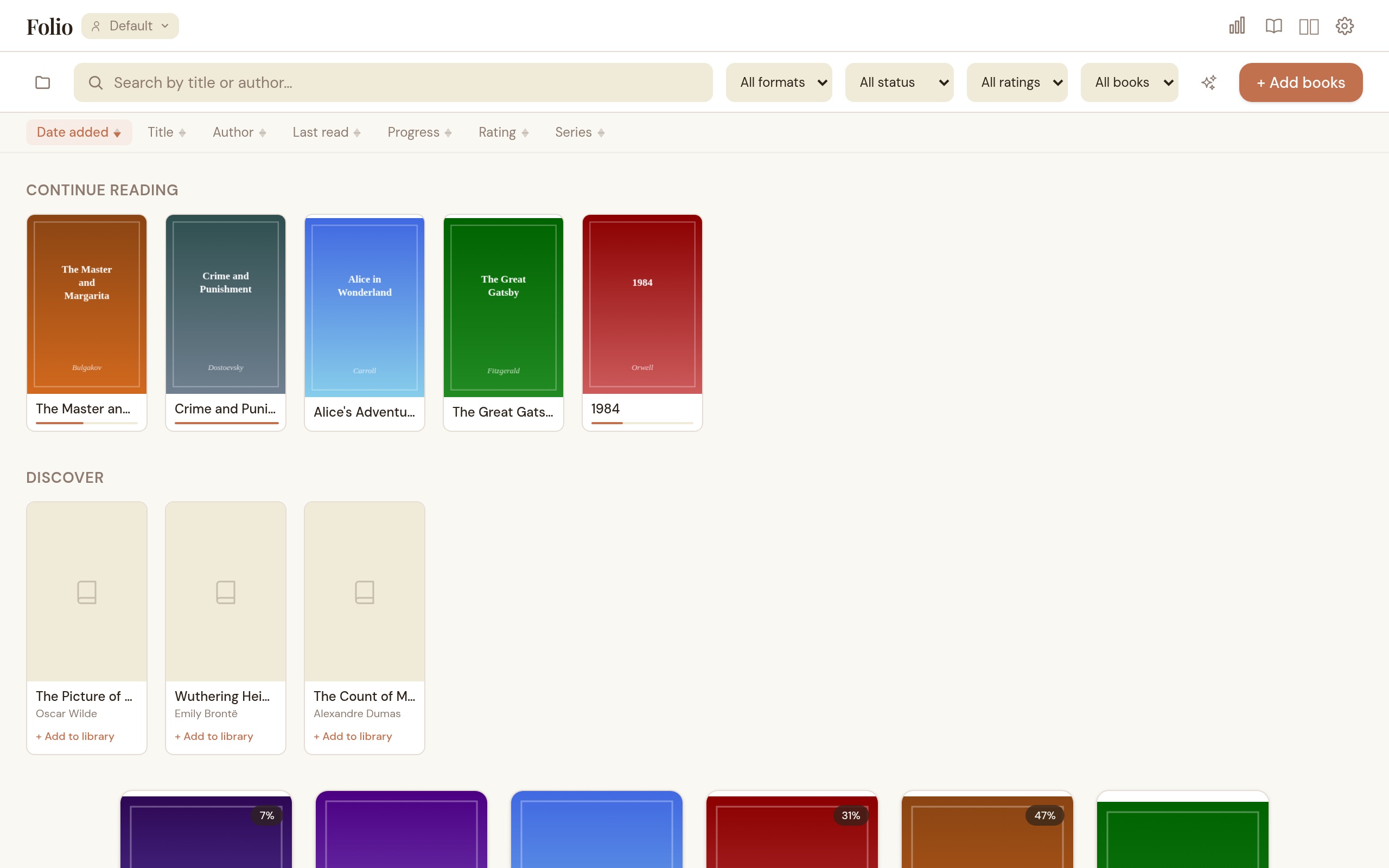
What Folio does well
Reading comfort first, library management second, and no push toward a store or cloud account.
EPUB, MOBI, PDF, CBZ and CBR
Five formats in one reader. Reflowable ebooks, Kindle MOBI/AZW files, fixed-layout PDFs, and comic archives — each with its own viewer. Read EPUBs page-by-page or in continuous scroll. Dual-page spreads and right-to-left manga mode work across all formats.
Collections, tags and series
Manual and rule-based collections, plus smart suggestions that spot patterns in your library. Freeform tags, series grouping with a stacked tile view, and filters that combine across format, status, rating, and tags.
Highlights, bookmarks and notes
Five highlight colors, named bookmarks, and notes on any passage. Search across all your highlights from the library when you remember the idea but not the book. Export as Markdown.
OPDS catalog browsing
Browse Project Gutenberg, Standard Ebooks, Wikisource, Gallica, and a dozen other free sources without leaving the app. Add your own catalog URLs (self-hosted Calibre, another Folio instance) and import with one click.
Metadata cleanup
Fix messy libraries without doing it all by hand. Folio pulls covers, descriptions, and ratings from Google Books, OpenLibrary, Comic Vine, and the BnF. ISBN lookup first, then title+author fallback. ComicInfo.xml parsing for comics. Auto-scan on import or run a library-wide sweep.
Search inside the book
Cmd/Ctrl+F to search full EPUB text with context snippets and click-to-jump. A reading-time estimate in the footer tells you how much is left in the chapter and the book.
Themes and typography
Light, dark, sepia, or build your own palette. Save named themes and switch between reading moods. Four built-in fonts (including OpenDyslexic), bring-your-own TTF/OTF/WOFF2, line height, margins, hyphenation, and raw CSS injection for EPUBs.
Reading stats
Time spent reading, pages per day, books finished, streaks, and a 30-day activity chart. Shows up if you want it, easy to ignore if you don't.
Multiple profiles
Keep work, personal, and family libraries fully separate. Each profile has its own database, library folder, settings, and reading progress.
Remote access from any device
Read from your phone, tablet, or another laptop on the same WiFi. The built-in web server has its own library browser, reader, collections, and stats. An OPDS endpoint lets KOReader, Thorium, Calibre, and Moon+ Reader connect directly. PIN-protected, LAN-only, each surface toggles independently.
Backup and cross-device sync
Export your library locally or push backups to S3, FTP, SFTP, or WebDAV. Reading progress, bookmarks, and highlights sync across machines through the same remote storage — no third-party sync service involved.
Split view
Read two books side by side. Pick a companion from the library picker and each pane tracks its own progress. Swap panes, close the companion, or reopen later — the pairing persists per book.
Page thumbnails
A horizontal thumbnail strip for PDFs and comic archives. Click any page to jump there. Virtualized rendering keeps it fast on long books, and directional prefetch decodes upcoming pages before you scroll to them.
English and French
Full UI translation in English and French, with a flag dropdown to switch on the fly. Error messages and accessibility labels included, not just menu items. More languages can be added as JSON files.
See how it works before you install
The user guide walks through installation (including macOS Gatekeeper), importing and organizing books with tags, collections, and smart rules, reading with highlights and named bookmarks, enriching metadata from four providers, browsing and serving OPDS catalogs, setting up remote access and multi-device sync, and customizing themes, typography, and CSS to fit how you read.
Read the User GuideDownload Folio
v2.2.1
Why it feels different
Folio starts from a simple assumption: if your books are already yours, your reading app should not try to become a store, a subscription, or a cloud platform. It should be a good place to read and a sane place to keep your library.
Your files stay local. Import by file, folder, URL, or drag-and-drop. Read EPUB, MOBI, PDF, CBZ, and CBR. The cover grid is built for big shelves — thumbnails are lightweight and only the rows on screen render, so scrolling stays smooth with thousands of books. EPUBs work in paginated or continuous scroll mode, with a reading-time estimate in the footer so you know how much is left. Search inside any EPUB with Cmd/Ctrl+F, or search across all your highlights and notes from the library view. Zoom into pages, jump back through your navigation history, and come back later without losing your place. Open two books side by side in split view when you need a reference. A page-thumbnail strip lets you scrub through PDFs and comics visually. Focus mode hides the chrome when you want to disappear into the book.
Want to read from your phone on the couch? The built-in web server lets you browse and read your library from any device on the same WiFi, and the same server exposes an OPDS endpoint that KOReader, Calibre, Thorium, and Moon+ Reader can connect to directly. Reading progress, bookmarks, and highlights sync across your machines through whatever remote storage you already trust — S3, FTP, SFTP, or WebDAV. The point is not to do everything. The point is to do the parts that actually matter when you sit down with a book.